How I Reduced API Latency by Using Caching
A practical look at caching strategy that reduced latency and stabilized backend performance.
Backend systems do not become slow suddenly. They degrade gradually. A few extra queries here, a couple of new dashboard metrics there, and over time what once felt instant starts to feel heavy.
In my e-commerce project, this gradual degradation became visible in the admin dashboard. Response times increased, database load rose steadily, and scaling the application servers did little to help. The system was working correctly — but inefficiently.
This article takes a theoretical yet practical approach to explain:
- Why caching is necessary in backend systems
- Why admin dashboards are especially expensive
- Why databases alone are not enough
- How caching solves the underlying problem
- How this theory maps directly to my implementation

Backend Systems as Optimization Problems
At a high level, backend engineering is an optimization problem.
Given:
- Incoming requests
- Finite compute resources
- A database with real physical limits
The goal is to serve correct responses with minimal time and minimal cost.
Formally, every API request has a cost:
- CPU time
- Memory usage
- Database reads
- Network overhead
When traffic increases, the system must either:
- Become more efficient,
- or Scale horizontally (which increases cost)
In my case, the admin APIs were functionally correct, but far from optimal.
Why Admin Dashboards Are Naturally Expensive
Admin dashboards are different from user-facing APIs.
They typically:
- Aggregate large datasets (orders, revenue, users)
- Compute metrics over time windows (this month, last month, last year)
- Produce derived data (percent change, charts, ratios)
- Are read-heavy and frequently refreshed
In my project, a single dashboard load triggered:
- Multiple find() queries on large collections
- Repeated aggregation logic in application code
- Redundant recomputation of the same results
Every refresh repeated the same work.
The Core Problem: Repeated Computation
The database was doing exactly what it was asked to do — repeatedly.
But repetition is waste.
If:
- The underlying data changes slowly
- The same results are requested frequently
- Exact real-time accuracy is not mandatory
Then recomputing results on every request is unnecessary.
This is the exact scenario caching is designed for.
Why the Database Alone Is Not Enough
A common assumption is:
“If queries are slow, we should optimize the database.”
Indexing and query tuning help, but they do not eliminate the fundamental issue that the database still executes the query every time.
Even a perfectly indexed aggregation query:
- Consumes CPU
- Scans index structures
- Allocates memory
- Competes with write traffic
As traffic grows, the database becomes the bottleneck.
Caching changes the equation entirely.
What Caching Really Means (Conceptually)
Caching is not about speed alone.
Caching is about avoiding unnecessary work.
Conceptually, caching introduces memory into the system that remembers answers to expensive questions.
Instead of asking:
“Compute this again”
The system asks:
_“Have I already computed this recently?”
_If yes, return the stored result.
This transforms repeated computation into a constant-time lookup.
Viewing API Requests as a Flow
Without caching:
Request → Validation → Database → Aggregation → ResponseWith caching:
Request → Cache Lookup → (Hit) → Response
                     → (Miss) → Database → Aggregation → Cache → Response
Only the first request pays the full cost.
Subsequent requests are almost free.
Applying This to the Admin Stats APIs
In my project, I applied caching specifically to:
- Dashboard summary stats
- Pie chart data
- Bar chart data
- Line chart time series
Each endpoint follows the same logical pattern:
- Generate a deterministic cache key
- Check Redis for existing data
- If found, return immediately
- If not found:
- Compute the stats
- Store the result with a TTL
- Return the response
This approach ensures correctness while eliminating repeated computation.
Time-to-Live (TTL): Why Data Expiry Matters
Cached data cannot live forever.
Admin stats represent a balance between:
- Freshness
- Performance
Some data changes frequently (today’s revenue), while other data changes slowly (6-month trends).
Using a TTL (Time-to-Live) ensures:
- Cached data expires automatically
- The system eventually recomputes fresh values
- No manual invalidation is required for most cases
Different endpoints use different TTLs based on volatility.
Cache Safety and Reliability
Caching must never break correctness.
To ensure safety, the implementation includes:
- Graceful fallback to the database if cache fails
- Feature flags to disable caching instantly
- Defensive JSON parsing
- Deterministic keys to avoid collisions
The system always prefers correctness over speed.
The Performance Impact
After introducing caching:
- Average latency dropped significantly
- P95 and P99 latency stabilized
- Database read load decreased
- The admin UI felt consistently fast
The most important improvement was not raw speed — it was predictability.
Lessons Learned
- Caching is an architectural decision, not a shortcut
- Admin dashboards are ideal candidates for caching
- Avoid caching raw data, cache computed results
- TTL design matters more than cache size
- Measure before and after — intuition is not enough
Full Code Reference
The caching logic discussed in this article is not an isolated experiment. It is part of a complete, production-style full-stack e-commerce application where performance, scalability, and correctness all matter together.
The full project implementation can be found here:
Full Code (Full-Stack E-Commerce Project with Admin Stats & Caching)
👉 https://github.com/AkshatJMe/ECommerce
This project represents an end-to-end e-commerce system and includes the following major components.
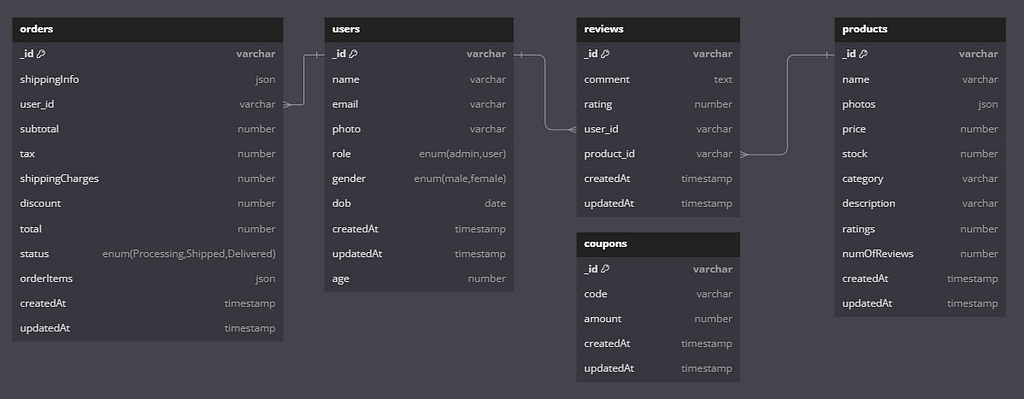
Schema
Core E-Commerce Functionality
At its foundation, the project implements standard e-commerce workflows:
- User authentication and authorization system
- Secure login and registration
- Role-based access control (Admin, Seller, Buyer)
- Protected routes and token-based authentication
- Buyer-side features
- Product browsing and filtering
- Product details and inventory awareness
- Cart management and checkout flow
- Order placement and order history
- Seller-side features
- Product creation and management
- Stock tracking and updates
- Order visibility and fulfillment status
These features generate the underlying data that powers the admin analytics layer.
Admin Dashboard and Analytics Layer
On top of the transactional system, the project includes an admin dashboard designed for operational visibility and business monitoring. This is where caching plays a critical role.
The admin layer includes:
- Dashboard summary statistics
- Total users, orders, products
- Revenue and discount metrics
- Month-over-month growth calculations
- Chart-based analytics
- Pie charts for order status, category distribution, and revenue breakdown
- Bar charts for monthly user, product, and order trends
- Line charts for long-term revenue and discount analysis
These endpoints rely on aggregation-heavy queries and derived metrics, making them ideal candidates for caching.
Caching and Performance Infrastructure
The performance improvements described in this article are implemented using:
- Redis as an in-memory caching layer
- Deterministic cache keys for admin analytics endpoints
- Endpoint-level caching for:
- Dashboard statistics
- Pie chart data
- Bar chart data
- Line chart time-series data
- TTL (Time-to-Live) based cache expiration
- Shorter TTLs for frequently changing metrics
- Longer TTLs for historical and trend-based analytics
Helper utilities for:
- Cache reads and writes
- Safe fallback to database queries
- Controlled cache invalidation
This ensures that expensive computations are reused while maintaining correctness and freshness.
Why This Matters
The key takeaway is that caching is not implemented in isolation. It is deeply integrated into a realistic full-stack system that includes authentication, business logic, database modeling, and frontend consumption.
The admin caching layer works because it understands:
- The nature of e-commerce data
- The difference between transactional accuracy and analytical freshness
- The performance limits of databases under repeated aggregation
This makes the solution practical, scalable, and representative of real-world backend engineering.
Final Thought
Caching is not about making systems faster.
It is about not doing work you have already done.
When applied thoughtfully, caching transforms backend systems from reactive to efficient — and in my case, it turned an increasingly slow admin dashboard into a stable, scalable one.
Related Articles
Implementation and Performance Comparison of Sequential and Parallel Merge Sort Does Parallel Merge Sort Really Win? Implementing and Comparing from Scratch
A from-scratch comparison of sequential vs parallel merge sort, and why parallel doesn't always win.
Understanding the Tradeoff Between Reads and Writes in Databases and Why You Can’t Optimize Both at the Same Time
A clear explanation of the read/write tradeoff in databases and its impact on performance decisions.
Chess.com’s Authentication Flow — What’s Missing and How to Fix It
Exploring Chess.com's authentication system: what happens when email verification is missing, the security vulnerabilities it creates, and how to build a stronger authentication flow